
The oil change indicator or the message "service overdue" appears on your Fiat 500, 500L, 500X, Ducato, or Tipo? This maintenance warning indicates that an oil change is required. Once the engine oil has been replaced, you need to reset the maintenance counter, either manually via the dashboard or electronically with an OBD diagnostic tool.
Models concerned: Fiat 500 (1.2 petrol, 1.3 multijet, 1.4 petrol, diesel, hybrid, electric), Fiat 500L, Fiat 500X (petrol, diesel), Fiat Ducato (130 multijet, 140 multijet, 2.3 multijet), Fiat Tipo, Fiat Panda. Years: 2015 to 2023.
To reset the oil change indicator and perform the maintenance counter reset, it is crucial to determine the manufacturing year of your vehicle. The reset method may vary between a manual procedure via dashboard controls or an electronic operation using an OBD diagnostic tool.
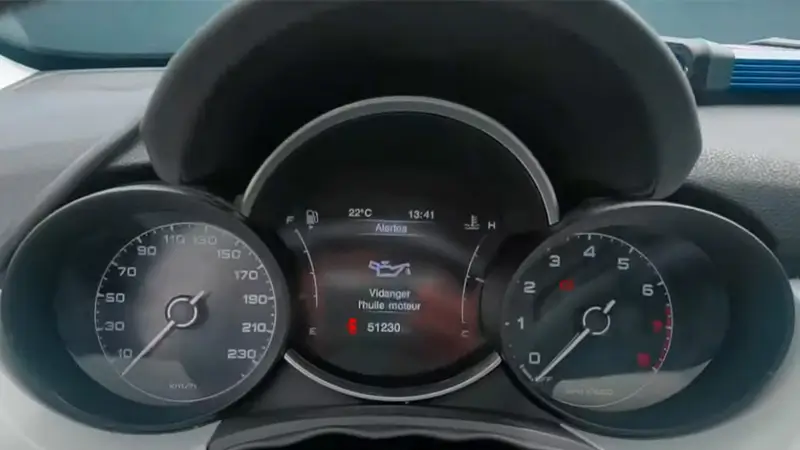
What does the oil change indicator look like on a Fiat?
The maintenance counter on your Fiat vehicle serves to remind you of important maintenance deadlines, particularly the engine oil change. The frequency of this operation depends on the engine type and the oil used: it is generally set at 15,000, 20,000, or 30,000 kilometres, according to the manufacturer's factory recommendations.
On Fiat models such as the 500, 500L, 500X, Tipo, or Ducato, this reminder may appear on the dashboard in various forms:
- A spanner symbol, indicating mechanical maintenance.
- A text message like "change engine oil," "scheduled maintenance," or "service overdue" on the central dashboard screen.
- An oil change indicator accompanied by an audible signal when starting the vehicle.
The message "service overdue" (from the Italian "tagliando scaduto") means that the scheduled maintenance is overdue. This message, specific to Fiat vehicles, indicates that it is time to service your car and perform the engine oil change.
It is essential to pay attention to these signals to maintain the proper functioning of the engine and ensure the longevity of your vehicle.
Fiat maintenance reset and service reset
Resetting the oil change indicator electronically
On Fiat models 500, 500L, 500X, Ducato, and Tipo, it is possible to clear the oil change indicator and reset the maintenance interval using the klavkarr 210 and 310.
With the klavkarr 210 and 310 diagnostic tools, there is no need to visit a garage. Perform the oil change counter reset on your Fiat yourself.
How to perform a service reset on Fiat?
You can remove the engine oil change indicator and clear the "service overdue" message with the klavkarr 210 and 310. To do so, simply follow these steps:
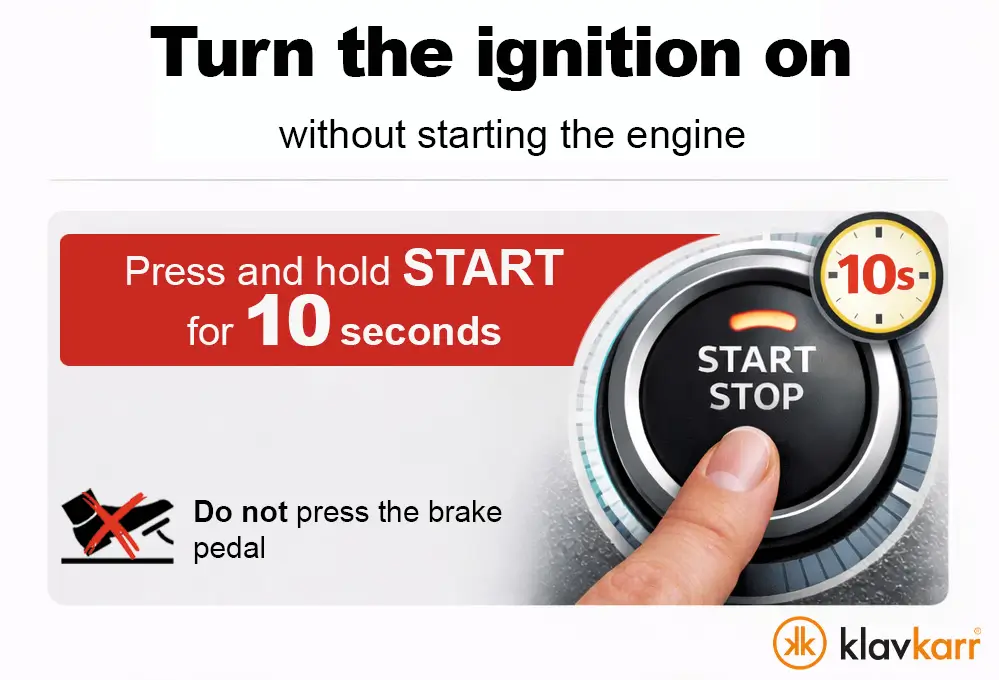
- Switch on the ignition. For vehicles equipped with keyless start, press and hold the start button for approximately 10 seconds without pressing the brake pedal to avoid starting the engine.
- Connect to your klavkarr.
- Select the car brand "Fiat."
- Then choose your model: "500, 500L, 500X, Ducato, Tipo, Panda."
- In the selection window that appears, choose "ECU Maintenance Interval."
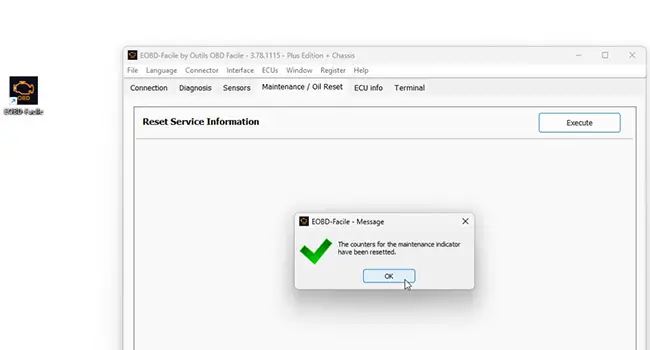
- Next, go to the "Diagnostic" tab and then "Maintenance/oil change."
- Click the "Execute" button next to "Reset maintenance information" and confirm with OK.
- That's it, you have cleared the oil change indicator and reset the maintenance counter.
If your vehicle is equipped with a DPF (Diesel Particulate Filter), you will also need to perform the following operation:
- Go back.
- Click on "Change ECU" and choose "Engine ECU."
- Go to the "Diagnostic" tab and then "Maintenance/oil change."
- Click "Execute" next to "Oil change (Only for vehicles with DPF)" and confirm with OK.
- That's it, the oil change counter has been successfully reset.
Since 2018, many Fiat models include a SGW (Security Gateway) system designed to secure the vehicle's electronic access.
Manually clearing the oil change indicator
On Fiat models, the procedure to turn off the oil change indicator and reset the maintenance counter is also manual. The technique is quite simple. You can refer to the manufacturer's recommendations via your user manual.
Most often, you just need to perform a manipulation with the accelerator pedal or the dashboard buttons to turn off the indicator. This may vary depending on the model and year of your vehicle.
For Fiat 500, 500L, and 500X models manufactured before 2016:

- Close the doors.
- Turn on the ignition.
- Slowly and fully press the accelerator pedal three times within 10 seconds.
- Turn off the ignition and wait a few seconds.
- Start your vehicle.
- That's it, the oil change indicator is now off.
For Fiat models manufactured after 2016:
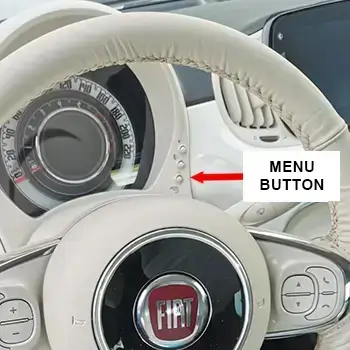
- Close the doors.
- Turn on the ignition.
- Using the menu button (or the arrows on the steering wheel), navigate to: "Settings" > "Service" or "Maintenance" > "Oil change reset."
- If the option appears: confirm with OK.
- Confirm: select "Yes" or "OK."
- Turn off the ignition and wait a few seconds.
- Start your vehicle.
- That's it, the oil change indicator is now off.
For Fiat Ducato (130 multijet, 140 multijet, 2.3 multijet):
The procedure varies depending on the year. For models from 2016 to 2023, use the dashboard controls to access the "Maintenance" menu and then "Oil change reset." For older models, the accelerator pedal manipulation also works.
Some recent Fiat vehicles do not display the reset option via the onboard computer. In this case, the only method to clear the indicator is to use an OBD2 diagnostic tool.
Beware of the Security Gateway on some recent models
Since 2018, some Fiat models are equipped with a module called Security Gateway (SGW). This electronic device acts as a firewall, preventing access to the vehicle's active functions via the OBD port, i.e., those that allow parameter modifications, writing to ECUs, or acting on the vehicle, particularly in our case, resetting the oil change indicator.
If you are using a standard diagnostic tool and it cannot access the maintenance ECUs to perform the reset, it is very likely due to this security system.
Using an SGW bypass becomes essential. It is an adapter to connect between the diagnostic tool and the OBD port to restore access to maintenance functions.
Frequently asked questions about Fiat oil change reset
What does the "service overdue" message mean on Fiat 500?
The "service overdue" message (from the Italian "tagliando scaduto") means that the scheduled maintenance is overdue. This is a specific alert for Fiat vehicles indicating that it is time to perform the engine oil change and vehicle maintenance.
How to turn off the engine oil change indicator on Fiat?
You can turn off the indicator in two ways: either manually via the dashboard controls (accelerator pedal for models before 2016, or "Maintenance" menu for models after 2016), or electronically with an OBD diagnostic tool like the klavkarr 210 or 310.
How to reset the oil change on Fiat Ducato 130 multijet?
For the Ducato 130 multijet, you can use the dashboard menu (Settings > Maintenance > Oil change reset) or an OBD tool. The electronic procedure with klavkarr allows direct access to the maintenance interval ECU for a complete maintenance counter reset.
Why does the oil change indicator remain on after the oil change on my Fiat?
The indicator remains on because the maintenance counter must be manually reset after each oil change. This reset is not automatic and requires either a manipulation via the dashboard or the use of an OBD diagnostic tool.
Learn more
Share this article