
The oil change/service warning light has come on in your Renault. Have you performed the vehicle’s maintenance? If not, you need to change the oil yourself or take it to a mechanic. If you have already carried out the maintenance, you just need to reset your Renault.
Supported models: Renault Clio 5, Captur 2, Megane 4, Scenic 4, Trafic 3 – All petrol, diesel, and hybrid engines
To turn off the oil change warning light on your post-2019 Renault, the first thing to know is your car’s year of manufacture. The procedure changes depending on the year. Otherwise, you can always do it electronically with a diagnostics scanner.

What the oil change warning light looks like on post-2019 Renault
The maintenance counter reminds you to service your vehicle, in particular to change the engine oil. Depending on your vehicle’s engine type and chosen oil, the oil change is due every 5 000 / 10 000 / 15 000 / 20 000 km… this interval is set by the manufacturer at the factory.
On Renault Megane 4, Scenic 4, Clio 5, Trafic 3… you can recognize this warning light on your dashboard either as:
- A spanner icon
- The “SERVICE” indicator

Service interval reset on post-2019 Renault
Clearing the oil change warning light electronically
On Renault models, you can clear the oil change warning light with your Klavkarr 210 or 310 Car Diagnostics Scanner.
With the Klavkarr 210 or 310 scanner, you no longer need to visit a mechanic—clear the warning light yourself
How to reset the service interval?
You can clear the oil change warning light and remove the service key using the EOBD Facile software included with the Klavkarr 210 or 310. It’s simple:
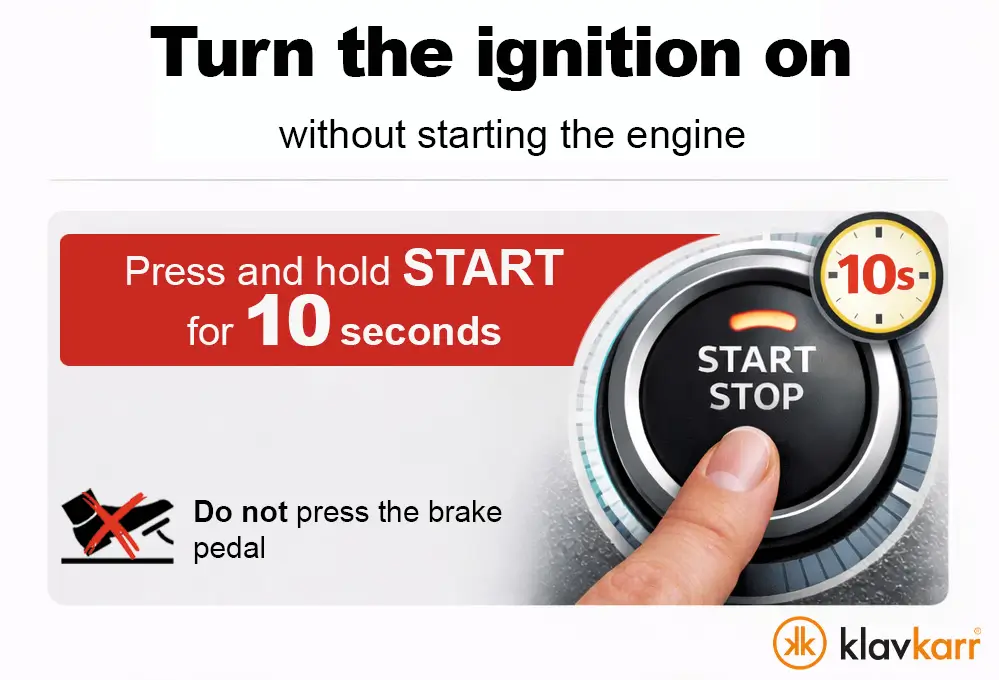
- Switch on the ignition. For vehicles equipped with keyless start, press and hold the start button for approximately 10 seconds without pressing the brake pedal to avoid starting the engine.
- Connect to your Klavkarr scanner
- Select the car brand “Renault”.
- Then choose your model: “Clio, Captur, Scenic, Megane, etc.”.
- In the list of ECU options, select “Maintenance Interval ECU”.
- Go to the “Maintenance/Oil Change” tab.
- Click “Execute” next to “Set distance in km until next oil change” and confirm OK.
- In the new window, enter the number of kilometers until the next oil change, then confirm OK.
- Click “Execute” next to “Set time in days until next oil change” and confirm OK.
- In the new window, enter the number of days until the next oil change, then confirm OK.
- Click “Execute” next to “Set distance in km until next maintenance”.
- In the new window, enter the number of kilometers until the next maintenance, then confirm OK.
- Click “Execute” next to “Set time in days until next maintenance” and confirm OK.
- You have now cleared the oil change warning light and reset the service interval counter
To know which kilometers and days to enter, refer to your user manual and follow the manufacturer’s recommendations.
Manually clearing the oil change indicator
On Renault models, the procedure to turn off the oil change indicator and reset the maintenance counter is also manual. You can refer to the manufacturer’s instructions in your user manual.
Most of the time, you just need to press and hold the “OK” button on the right side of the steering wheel until the warning light goes out.
According to Renault’s recommendations and your car’s year, resetting is done via the “OK” button. This applies to the following models:
Clio 5 – 2023 / 2024 / 2022 / 2021 / 2020 / 2019
Captur – 2024 / 2023 / 2021 / 2020 / 2019
Scenic 4 – 2024 / 2022 / 2021 / 2020 / 2018
Megane 4 – 2023 / 2022 / 2021 / 2020 / 2018
Trafic 3 – 2023 / 2022 / 2021

- Switch on the ignition.
- Navigate to the oil change remaining mileage display using the steering wheel arrow buttons and press “OK” to select.
- Press and hold the “OK” button for about 10 seconds until the display is fixed.
- Navigate to the service remaining mileage display using the arrow buttons and press “OK” to select.
- Press and hold the “OK” button for about 10 seconds until the display is fixed.
- Turn off the ignition and restart your car.
For more information
Share this article