Is your ABS warning light on in your Renault? This orange indicator signals a malfunction in the anti-lock braking system. Whether you drive a Clio, Mégane, Captur, or Scénic, learn how to identify possible causes of this issue, read fault codes with a diagnostic tool, and easily reset or clear this warning light.
Affected models: Renault Clio (all generations), Mégane, Captur, Scénic, Kadjar, Talisman, Twingo, Zoé
The ABS warning light displayed on your dashboard requires special attention. Why does this signal appear? How can you diagnose the issue and reset this warning light?


Are you looking for a car scanner ?
What does the ABS warning light look like in a Renault?
In Renault vehicles, the ABS anti-lock braking system indicator is easy to recognise on the dashboard. It is a circle surrounded by two parentheses, with the letters "ABS" written in the centre.
This symbol lights up in orange on the dashboard, usually when the ignition is turned on. It should normally turn off after a few seconds. If it remains on while driving, it means a fault has been detected in the anti-lock braking system.
This warning light may appear alone or alongside other warning lights, depending on the detected issue.
Why might the ABS warning light turn on in a Renault?
In Renault models such as the Clio, Mégane, Captur, Scénic, or Kadjar, several reasons can trigger the ABS warning light. This indicator generally signals a malfunction or failure in the anti-lock braking system.
Here are the most common ABS issues:
- Faulty or dirty wheel sensors: These ABS sensors transmit information about the wheel rotation speed. If they are dirty or damaged, they send incorrect data, causing the warning light to turn on intermittently.
- Faulty ABS module: If the ABS control unit or hydraulic unit fails, the warning light remains permanently on and cannot be cleared without intervention.
- Low or contaminated brake fluid: A drop in fluid level, a leak, or impurities in the braking system can trigger an ABS error code.
- Weak battery or electrical issue: Low voltage disrupts the ABS system's operation and generates a fault code.
A diagnostic scan with an OBD tool allows you to pinpoint the exact component causing the issue before performing any repairs.
How to clear and reset the ABS warning light with a diagnostic tool
To clear the ABS warning light on your Renault, use a compatible diagnostic tool such as our klavkarr 310. This professional diagnostic tool is compatible with Renault ABS control units and allows you to read, analyse, and clear fault codes associated with the warning light.
Here is the complete procedure to reset the ABS warning light:
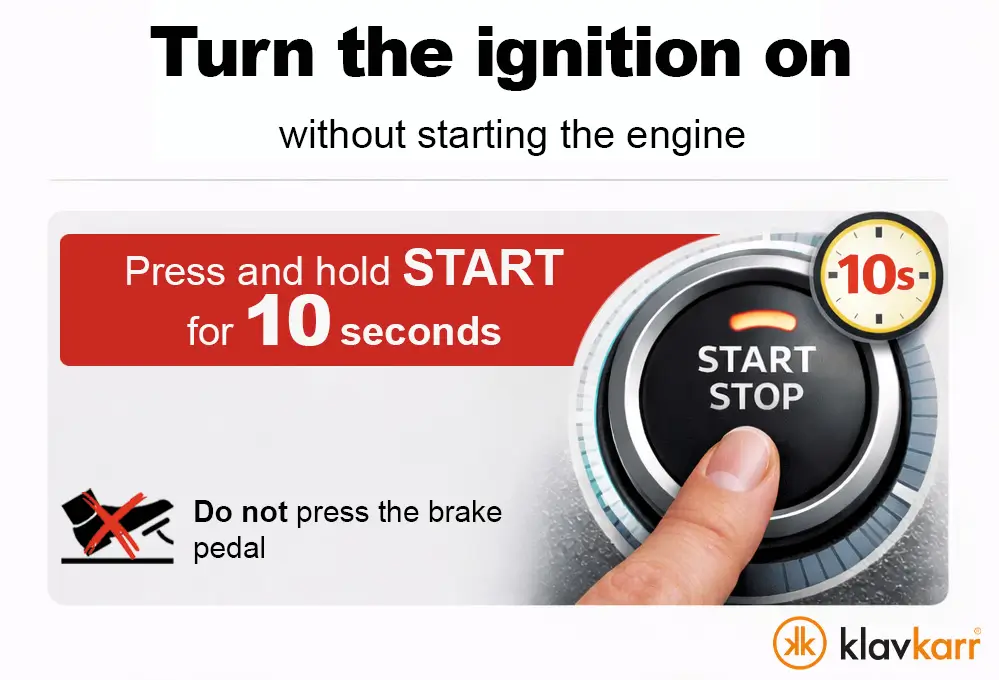
- Switch on the ignition. For vehicles equipped with keyless start, press and hold the start button for approximately 10 seconds without pressing the brake pedal to avoid starting the engine.
- Plug your klavkarr 310 scanner into your Renault's OBD port.
- Launch the klavkarr app on your smartphone.
- Connect to your klavkarr device via Bluetooth.
- Select the brand: "Renault".
- Select the model: "Clio, Mégane, Scénic, Captur, Kadjar..."
- Choose the control unit: "ABS ECU" or "Braking System" and then click "Next".
- Go to "Diagnostics" and then "Fault Codes" to read the stored errors.
- Note the displayed fault codes to understand the cause of the issue.
- Press "Clear" and confirm by clicking "Ok".
The ABS warning light will no longer appear on your dashboard after this procedure.
Important: If the actual fault is not repaired, clearing the fault code will not suffice. The warning light will automatically turn back on as soon as the system detects the issue again during the next start or while driving.
Frequently asked questions about Renault ABS warning lights
Can you drive with the ABS warning light on in a Renault?
You can drive with the ABS warning light on, but the anti-lock braking system will not function during emergency braking. It is recommended to diagnose the issue quickly for your safety.
Does the ABS warning light reset itself?
The warning light may turn off automatically if the issue was temporary, such as a dirty sensor that cleaned itself. For a persistent fault, you need to use a diagnostic tool to clear the fault code after repair.
Which diagnostic tool should I use for a Renault ABS issue?
The klavkarr 310 is perfectly suited to diagnose and clear ABS fault codes on all Renault models. This OBD2-compatible tool provides access to the ABS control unit and allows you to reset the warning light easily.
Should you repair before clearing the ABS warning light?
Yes, it is essential to identify and repair the cause of the issue before clearing the warning light. Otherwise, the light will immediately turn back on as the fault will be detected again by the system.